How analysis credits work in Leewou
What analysis credits are, what consumes them, when they reset, and how to track your usage so you never get caught off guard.
Every time you open a creator's full profile - the audience breakdown, engagement rate, top content, and estimated reach - that counts as one analysis credit. Credits are the currency of Leewou, and knowing how they work saves you from hitting a wall mid-campaign.
What counts as an analysis credit
An analysis credit is consumed the first time you view a creator's full profile data. That's it. Viewing the same profile again - same month, any number of times - doesn't cost an additional credit. You only pay once per creator per billing period.
- Opening a creator profile from Discover results - 1 credit.
- Re-opening the same profile later that month - 0 credits (already analyzed).
- Viewing a profile from a List or saved search - 1 credit if not yet analyzed this period.
- Running searches - 0 credits. Searches are unlimited on all paid plans.
Searches are free. You can run as many Discover searches as you want, apply filters, and browse results without spending any credits. Credits only count when you open a full profile.
How many credits does each plan include
Each plan comes with a fixed number of analysis credits per billing month. Here's the breakdown:
- Trial - 20 analysis credits (one-time, not renewed monthly).
- Essentials - 300 analysis credits per month.
- Performance - 800 analysis credits per month.
- Enterprise - 5,000+ analysis credits per month (exact amount set at contract).
Trial credits don't renew. Once your 20 credits are gone, you'll need to subscribe to keep analyzing profiles.
When credits reset
Credits reset at the start of each billing period - the same day your subscription renews each month. Unused credits don't carry over. If you analyzed 200 out of 300 profiles in March, you start April back at 300.
The reset date matches your subscription renewal date. If you signed up on the 15th, your credits reset on the 15th of every month. You can find your next reset date in Plan & billing → Current plan under the billing period section.
Tracking your credit usage
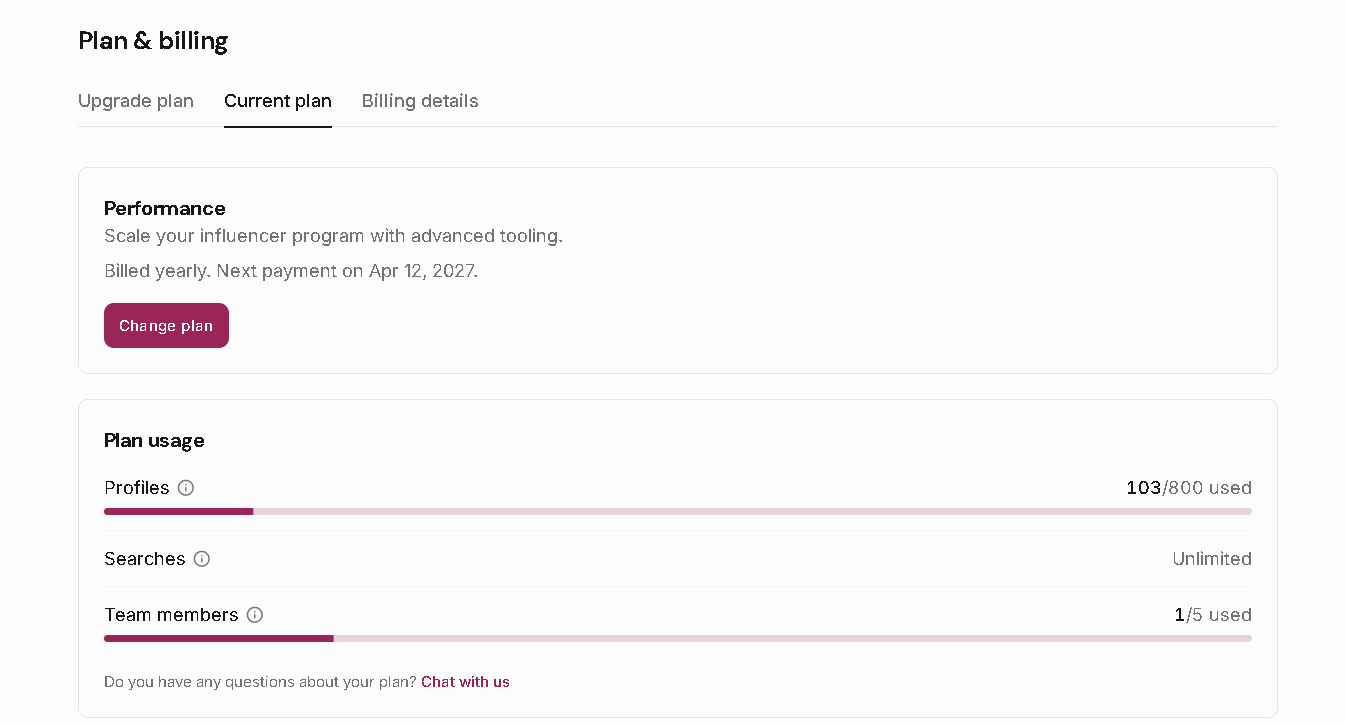
You can check your usage any time from Plan & billing → Current plan. The usage section shows how many analysis credits you've used and how many remain in the current period - along with a progress bar that turns amber when you're approaching 80% and red at 95%.
- Go to Plan & billing in the left sidebar.
- Click the Current plan tab.
- Scroll to the Plan usage section.
- Check the Analysis credits row - it shows used / total and a visual progress indicator.
Pro tip: Team members share the same credit pool. If your workspace has multiple people running discovery simultaneously, monitor the usage bar more frequently - credits draw down faster when the whole team is active.
What happens when you run out of credits
When your analysis credits hit zero, you can still search and browse Discover results - you just can't open full profiles until the next reset or until you upgrade. Leewou won't auto-charge you or let you overspend. You'll see a notice on the profile when you try to open it.
If you're running out regularly, upgrading to the next plan tier is the most straightforward fix. Performance gives you 800 credits versus Essentials' 300 - more than double, and it unlocks additional team seats at the same time.
FAQ