How to use creator search filters in Leewou
Use creator search filters in Leewou to narrow by audience, performance, content, and contact data without over-filtering the search.
Creator search filters can save you hours or bury you in a dead search. The difference is not the size of the database. It is how you build the stack. In Leewou, the best filter setups remove obvious misses fast, leave enough profiles to compare, and stay simple enough that you know why the results changed.
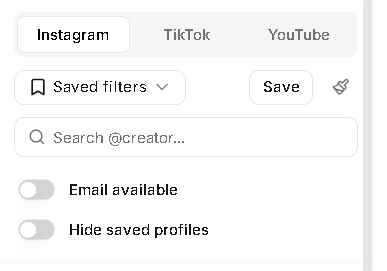
Start with the platform and the one thing that cannot bend
Pick Instagram, TikTok, or YouTube before you touch anything else. Each platform remembers its own filters, sorting, and page state, and the available filters change with the platform. A YouTube search has subscribers, content type, and official artist filters. Instagram gives you Reels plays, account type, audience brand categories, and the Fake followers filter.
- Choose the platform that matches where the campaign will actually run first.
- Write down the one requirement that cannot bend, usually audience market, audience age, or creator size.
- Decide whether you are optimizing for reach, response, or immediate outreach.
- Keep the first pass narrow enough to remove obvious misses, not so narrow that only three creators survive.
Pro tip: If the brief is still fuzzy, do not start with ten filters. Pick one audience requirement and one performance floor.
Use audience filters when audience fit matters more than creator size
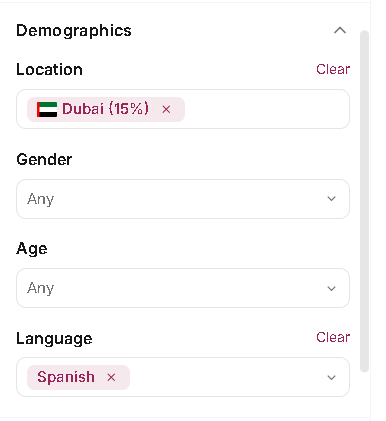
The Demographics section is where most teams should start. Location, Gender, Age, and Language all let you shape the pool around who the creator reaches instead of who the creator is on the surface. Location and Gender also split between creator and audience tabs, which matters more than people think.
- Use audience location when the campaign needs buyers in a specific country or city. Use creator location when the brand cares where the creator lives or works.
- Use Min audience % on audience filters to avoid matching profiles with only a tiny slice of the right audience.
- Use audience gender and age brackets when the product clearly skews toward one buyer group.
- Use language when creators need to post, reply, or sell in a specific language.
- On Instagram, use creator and audience categories when you want a faster read on niche fit and buyer interest.
If the brief is for French-speaking beauty buyers in Canada, audience filters do the heavy lifting. If the brief is for a Berlin-based photographer who creates in German, creator-side filters deserve more weight. The sidebar supports both. Use the side that matches the business question.
Use performance filters to keep the shortlist realistic
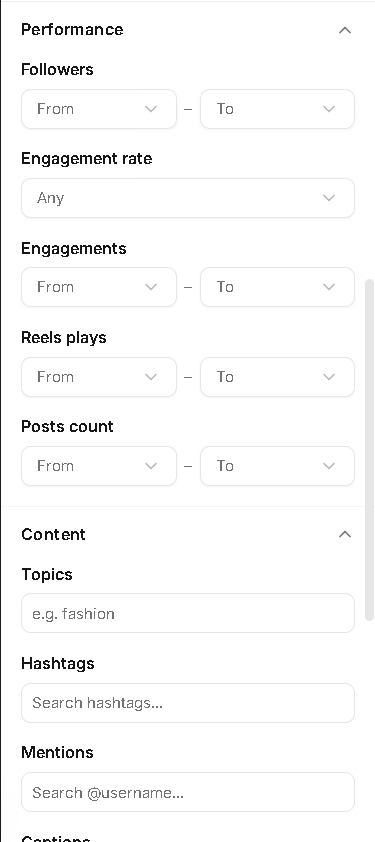
Performance filters stop you from comparing creators who should never have been in the same search. Followers or Subscribers, Engagement rate, Engagements, Posts count, and platform-specific view metrics help you bring the pool into the right operating range before you start opening profiles.
- Use Followers or Subscribers when budget, campaign size, or deliverable expectations set a hard range.
- Use Engagement rate to remove accounts that look large but do not get a response.
- Use Engagements when the raw volume matters more than the percentage.
- Use Reels plays on Instagram and Views on TikTok or YouTube when the brand cares about top-of-funnel reach.
- Use Shares and Saves on TikTok when you want content that travels or gets revisited, not just liked.
Note: Engagement rate is useful, but it should not run the search by itself. Pair it with engagements, views, or follower range so a tiny account does not win the whole search on percentage alone.
Use content and account filters when the brief is niche
This is where the search starts to feel custom. The Content section gives you Topics, Hashtags, Mentions, Captions, and Instagram Collaborations. YouTube swaps in Transcript search because keywords there map to video transcripts rather than hashtag discovery. The Account section adds Bio or Description, Last posted, Instagram Account Type, and YouTube Content type.
- Use Topics when you want the algorithm to pull creators around a theme before you name specific words.
- Use Hashtags or Mentions when the niche has obvious handles, creators, or communities around it.
- Use Captions or Transcript search when the exact language matters, like product claims, routines, recipes, or category terms.
- Use Collaborations on Instagram if you want creators who already worked with certain brands.
- Use Bio or Description when the role matters, like coach, dentist, founder, gamer, or stylist.
- Use Last posted and Content type to avoid dead channels or the wrong format mix.
These filters are powerful because they stack quickly. They are also the easiest place to overdo it. If you add Topics, Mentions, Captions, and Collaborations at the same time, do not be surprised if the pool collapses. Add one strong content signal, see what happens, then decide whether you need a second one.
Use the Other section to cut wasted review
The Other section is better for cleanup than discovery from zero. It holds follower growth filters, likes or views growth on TikTok and YouTube, Has sponsored posts on Instagram, Socials, Fake followers on Instagram, Official Artist channel on YouTube, and verified-only filtering. The top toggle row above the sections also gives you Email available and Hide saved profiles.
- Use growth filters when momentum matters more than raw size.
- Use Email available when the team needs creators you can contact right away.
- Use Socials when you want creators who expose a specific contact route like phone, Linktree, TikTok, or LinkedIn.
- Use the Fake followers filter on Instagram when audience quality is a hard requirement.
- Use Hide saved profiles when you rerun a brief and only want net-new names.
These are not the filters to start with unless contactability or audience quality is the brief. They are the filters that clean up a good search once the core audience and performance logic is already doing its job.
Build creator search filters in layers
Leewou reruns the search automatically after filter changes. There is no Apply button. That is fast when you stay disciplined, and confusing when you change six things in a row. If the results suddenly get worse, assume the last meaningful change caused it until proven otherwise.
- Start with one or two audience filters that define the brief.
- Add one performance floor so the results stay realistic.
- Sort and scan the first page before you add niche filters.
- Add one content, account, or contact filter if the pool still feels noisy.
- Watch the result size. If Leewou warns that only the first 9,990 results are accessible, the search is still too broad.
- Once the search is repeatable, save it instead of rebuilding it next week.
A good creator search filter stack should feel boring in the best way. You know why each filter is there. You can explain it to a teammate in a sentence. And when the results swing too hard, you know exactly which knob to turn back.
Pro tip: Name saved filters after the campaign, market, or audience, not after your mood that day. UK skincare creators is reusable. Test 2 is not.
FAQ
Frequently asked questions about creator search filters
These are the questions that usually come up once teams move from casual browsing to repeatable creator discovery.